
Get started in 20 minutes
Three short guides take you from install to first published rule.
Recipes
Step-by-step guides for the most common pricing patterns.
Browse by topic
- Setup & install, getting started, scopes, billing
- Building rules, tag matching, ordering, conditions
- Integrations: Recharge, Bold, Loop, loyalty apps
- Checkout & Shop Pay, how Functions apply at checkout
- Refunds & fulfillments, how prices flow into orders
- Plans & billing: Free, Standard, Plus
- Troubleshooting, common issues and fixes
Install TagTier and connect your storefront
Installing takes a minute. Connecting your storefront is one more click, once. Until you connect, shoppers see regular prices and your hidden wholesale products are visible in collections and search, so do it before you share wholesale pricing with anyone.
- Add TagTier from the Shopify App Store and approve the access it asks for. You land on the TagTier dashboard.
- The setup guide opens by itself. Click Open theme editor, or Enable on the Connect your storefront card.
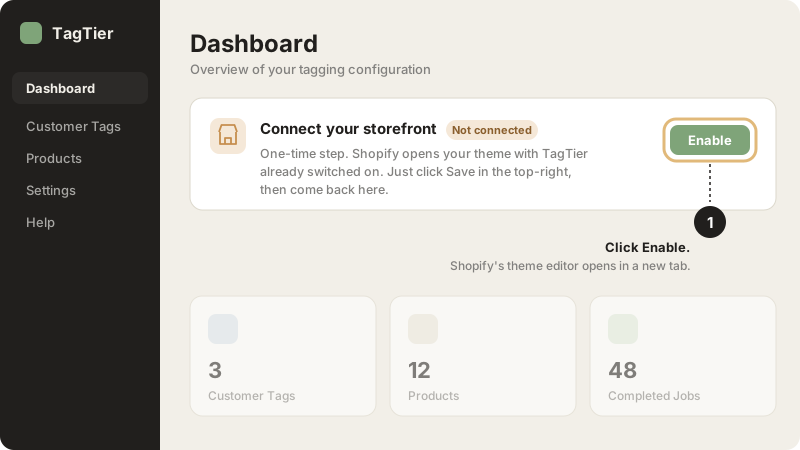
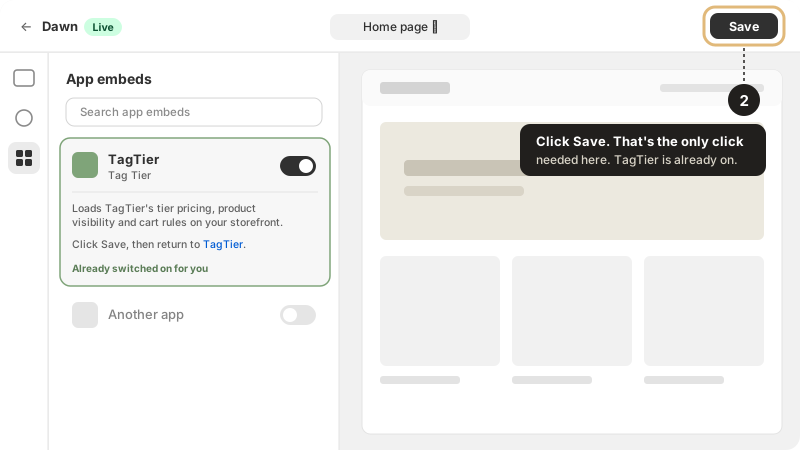
- Your live theme opens on the App embeds panel with TagTier already switched on. Click Save in the top-right. The toggle alone doesn't count; nothing is stored until you save.
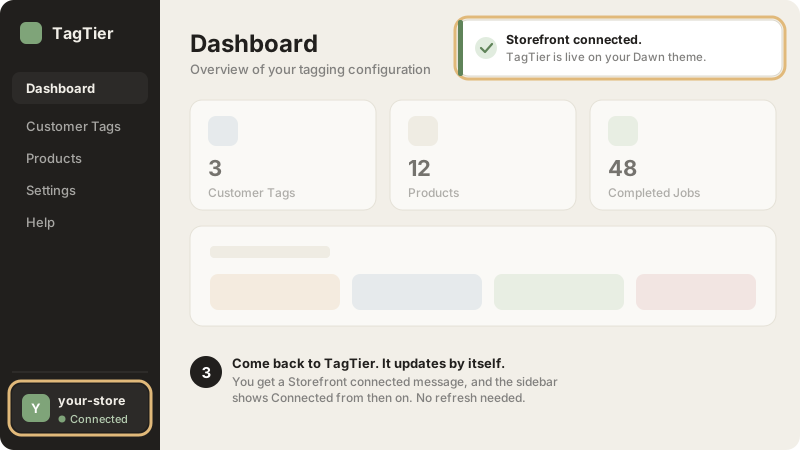
- Go back to the TagTier tab. Within a few seconds it confirms with a Storefront connected message, and the store at the bottom of the sidebar reads Connected. No refresh needed.
Why the extra click? TagTier runs on your storefront as a Shopify app embed. Shopify only lets store staff switch app embeds on. It's a setting, not a code edit: switching it off in Online Store → Themes → Customize → App embeds removes TagTier from the storefront with nothing left in your theme files. Pricing and settings stay in TagTier.
Switching themes? App embeds are saved per theme. After you publish a new theme, the TagTier sidebar flags Storefront not connected. Click Enable and Save again.
Installed TagTier before October 2026?
TagTier used to connect through a Shopify script tag, which needed no setup. Shopify stops running script tags on 1 March 2027. Your storefront keeps working until then, but connect now:
- On the dashboard, click Approve permission. Shopify asks you to approve read access to themes, so TagTier can see whether the embed is on. TagTier never edits your theme.
- Follow the steps above.
- TagTier removes the old script tag for you. Shoppers see no difference.
Still says Not connected?
- Check you clicked Save. Switching the toggle doesn't store anything on its own.
- Check it was the live theme. Enable opens your published theme. An embed switched on in an unpublished theme doesn't count until that theme goes live.
- Check the right store. If you manage several stores, the theme editor has to open for the store shown in TagTier's sidebar.
- TagTier missing from App embeds? Reload the theme editor once. Still missing, or can't open the theme editor at all? Email hello@tagtier.com with your store address and we'll connect it with you.
Recipe: Wholesale pricing on one storefront
The problem. You sell to consumers AND to a small but growing wholesale book. You don't want to maintain two stores, and Shopify's native B2B caps you at 3 catalogs unless you upgrade to Plus.
The TagTier pattern.
- In Shopify Admin → Customers, tag your wholesale accounts with something like
wholesale-a,wholesale-b,wholesale-c. - In TagTier → Rules, create a rule for each tier:
#wholesale-a→ 30% off, with quantity breaks at 6 and 12 units#wholesale-b→ 25% off#wholesale-c→ 20% off
- Order the rules by priority, first match wins.
- Test using the "Try as different customer" preview.
- Publish and watch the audit log.
What customers see. Logged-in wholesale customers see their tier price on every product page, in cart, at checkout, and in Shop Pay. Retail customers and guests see retail price.
What about refunds? TagTier writes the resolved price into each order line, so Shopify's native refund flow uses the price the customer actually paid.
Common gotcha. If a customer has multiple tags (wholesale-a AND vip-tier-1), TagTier uses the first matching rule in your priority order. Drag rules to reorder.
Still stuck?
Email hello@tagtier.com, average first reply under 4 hours during EU/US business days.